On occasion, I get a certain kind of email from Linked In. The email asks me to join Linked In because someone has asked to connect to me. That someone is always a person that I have hired to perform some service such as a broker.
Apparently, I am not alone in this particular style of engagement.
What happened? I have a linked in account thank you very much but it's not tied to the email address that I shared with the inviter. Yes, I have multiple email accounts.
I am not going to create a Linked In account for every email address that I have and I actually cannot accept your invite even if I wanted to nor do I know the email address that you used to create your Linked In account.
Is linked in an appropriate social network for this scenario? I don't think so. You provided a service for me so that made me your client. In my humble opinion, Linked In is more for professional peers than for professional services consultants connecting to their customers. If you want to reach me, then use the email address that I already gave you.
Saturday, February 22, 2014

Saturday, March 16, 2013
Building a Better Google Reader in an Hour
There is all this buzz from the blogosphere about the impending shutdown of Google Reader. Many folks are starting to suggest alternatives such as Feedly. Here is how you can build your own, better alternative to Google Reader and migrate to it in a hour.
Before we can build something better than Google Reader, we have to first recognize what makes Google Reader so great. Google Reader takes the RSS feeds from multiple sites. You can view each site's feed separately. You can view a feed that is the aggregation of all the separate feeds. You can search this combined feed.
The first thing you are going to have to do is get your feed information out of Google Reader. Google makes that very easy to do with Google Takeout. You start by clicking build. After awhile, it will be ready. You click the download link and save the zip file to your local hard disk. You open the compressed archive and look for a file called subscriptions.xml under the reader directory. You open this file with a text editor and search for the xmlUrl term. This will occur multiple times and right after this term are the URLs for the various RSS feeds that you have saved in Google Reader.
Now might be a good time for some house cleaning. Many of your feeds have either lost relevancy or are no longer maintained. I want you to go through this list and pick your top ten. You should also categorize them into high volume feeds (lots of posts every day, typically from a news organization) and low volume feeds (individual blogger whose opinions you value).
Let's focus on the aggregated feed feature first. For that may I suggest using Yahoo Pipes? You will need to click create a pipe to get started. From the sources section, drag the fetch feed badge over to the main area. In the URL text box, enter an xmlUrl from your list of top ten. Keep doing this until all ten feeds have badges. Move the badges around until they are in two groups of five each, high volume and low volume.
From the operators section, drag two union badges over. Each union can take five feeds. Drag the blue circle at the bottom of each feed to a blue circle at the top of the union operation. This is called connecting a feed source to the union operation. Drag a sort badge under each union badge. Connect each union operation to its own sort operation. Sort by publication date in descending order. Drag a truncate operation beneath each sort operation and connect them. Set the truncate number to something reasonable like 40. Drag one more union operation beneath the two truncate operations and connect them. Connect that last union operation to the pipe output.
Save the pipe, giving it a name, then run it. If the results look favorable, then copy the URL in the address bar for use later. Click the Get as RSS link and copy that URL in the address bar too. You may need both of those URLs in subsequent steps. Hit the back button then click the My Pipes link. Find the pipe you just created and click its publish link. This will make the pipe accessible without having to log in.
You can bookmark that first URL in your web browser. That will provide you with the aggregated feed feature. Do you have a smart phone and/or tablet? Then bookmark that same URL in your mobile web browser too. Yahoo Pipes plays well in both environments.
In order to search the feed, you might want to use a native RSS reader. May I suggest using Mozilla Thunderbird? Thunderbird is available for Mac, PC, and Linux. It does RSS and email too.
After installing, simply create a blogs and news feeds account. Find that new account on the left hand side then click manage subscriptions. Remember that second URL from three paragraphs up? Enter that second URL into the feed URL box then click add. This will surface the same aggregated feed here. The search text box in the upper right hand corner can be used to search this feed.
You can also add the ten original RSS URLs that you got while following the instructions in the third paragraph from the top of this blog to the blogs and news feeds account in Thunderbird. This will allow you to access individual feed content which was the last requirement for replacing Google Reader.
There you have it. With a little pruning and by using Google Takeout, Yahoo Pipes, and Thunderbird, you can build your own replacement to Google Reader. I think that you will find Yahoo's mobile experience to be better than Google's.
Before we can build something better than Google Reader, we have to first recognize what makes Google Reader so great. Google Reader takes the RSS feeds from multiple sites. You can view each site's feed separately. You can view a feed that is the aggregation of all the separate feeds. You can search this combined feed.
The first thing you are going to have to do is get your feed information out of Google Reader. Google makes that very easy to do with Google Takeout. You start by clicking build. After awhile, it will be ready. You click the download link and save the zip file to your local hard disk. You open the compressed archive and look for a file called subscriptions.xml under the reader directory. You open this file with a text editor and search for the xmlUrl term. This will occur multiple times and right after this term are the URLs for the various RSS feeds that you have saved in Google Reader.
Now might be a good time for some house cleaning. Many of your feeds have either lost relevancy or are no longer maintained. I want you to go through this list and pick your top ten. You should also categorize them into high volume feeds (lots of posts every day, typically from a news organization) and low volume feeds (individual blogger whose opinions you value).
Let's focus on the aggregated feed feature first. For that may I suggest using Yahoo Pipes? You will need to click create a pipe to get started. From the sources section, drag the fetch feed badge over to the main area. In the URL text box, enter an xmlUrl from your list of top ten. Keep doing this until all ten feeds have badges. Move the badges around until they are in two groups of five each, high volume and low volume.
From the operators section, drag two union badges over. Each union can take five feeds. Drag the blue circle at the bottom of each feed to a blue circle at the top of the union operation. This is called connecting a feed source to the union operation. Drag a sort badge under each union badge. Connect each union operation to its own sort operation. Sort by publication date in descending order. Drag a truncate operation beneath each sort operation and connect them. Set the truncate number to something reasonable like 40. Drag one more union operation beneath the two truncate operations and connect them. Connect that last union operation to the pipe output.
Save the pipe, giving it a name, then run it. If the results look favorable, then copy the URL in the address bar for use later. Click the Get as RSS link and copy that URL in the address bar too. You may need both of those URLs in subsequent steps. Hit the back button then click the My Pipes link. Find the pipe you just created and click its publish link. This will make the pipe accessible without having to log in.
You can bookmark that first URL in your web browser. That will provide you with the aggregated feed feature. Do you have a smart phone and/or tablet? Then bookmark that same URL in your mobile web browser too. Yahoo Pipes plays well in both environments.
In order to search the feed, you might want to use a native RSS reader. May I suggest using Mozilla Thunderbird? Thunderbird is available for Mac, PC, and Linux. It does RSS and email too.
After installing, simply create a blogs and news feeds account. Find that new account on the left hand side then click manage subscriptions. Remember that second URL from three paragraphs up? Enter that second URL into the feed URL box then click add. This will surface the same aggregated feed here. The search text box in the upper right hand corner can be used to search this feed.
You can also add the ten original RSS URLs that you got while following the instructions in the third paragraph from the top of this blog to the blogs and news feeds account in Thunderbird. This will allow you to access individual feed content which was the last requirement for replacing Google Reader.
There you have it. With a little pruning and by using Google Takeout, Yahoo Pipes, and Thunderbird, you can build your own replacement to Google Reader. I think that you will find Yahoo's mobile experience to be better than Google's.
Saturday, May 26, 2012
The Current State of Personal Assistant Software
Earlier, I had discussed some features in personal assistant software. What is the current state of the art for this category of software? The truth is that no single application covers all of these features. What you see today are applications that cover one or two of these features.
The most popular example of a software agent is Siri. Did you know that there are other examples too? Google alerts qualifies as a software agent in that you express a search wish and this app emails you whenever it finds what you are looking for.
Siri is also the leader when it comes to human interface factors but it wasn't the first. Mac OS X spotlight is one of the first examples that brought this type of feature to the mainstream. Ubuntu has also adopted this approach over menus with the Head Up Display part of its Unity interface.
Typically, it is web franchises that have gone to market with multiple platforms. Zoosk is a good example of this with first class, native versions of their web app that run on iPhone, iOS, Android, Windows, and Macintosh desktops.
Facebook and Google are the leaders when it comes to big data. There is a growing number of open source big data technologies that will make big data affordable for just about any start up or SMB. Hadoop is clearly the winner in this category with vendors such as Cloudera and Hortonworks. Solr/Lucene is more known for its search capabilities but should also be considered as a NoSql solution for big data requirements.
Google and Facebook also do a great job when it comes to real-time communications. Google talk is the most visible example of this. There are some mature open source technologies that bring real-time communications capabilities to start ups and SMB too. ejabberd, Tigase, and Open Fire are the three most notable examples of this.
What lies ahead are when these feature sets converge. Those apps don't exist yet but there are some early adopters that are worth keeping your eyes on. Opportunity Eye is an initiative that promises to explore what it would be like to have a full featured personal assistant that combines features from each of these categories.
How much synergy can be discovered with personal assistants that combine elements from software agents, human interface factors, multiple platforms, big data, and real-time communications? Let's find out.
The most popular example of a software agent is Siri. Did you know that there are other examples too? Google alerts qualifies as a software agent in that you express a search wish and this app emails you whenever it finds what you are looking for.
Siri is also the leader when it comes to human interface factors but it wasn't the first. Mac OS X spotlight is one of the first examples that brought this type of feature to the mainstream. Ubuntu has also adopted this approach over menus with the Head Up Display part of its Unity interface.
Typically, it is web franchises that have gone to market with multiple platforms. Zoosk is a good example of this with first class, native versions of their web app that run on iPhone, iOS, Android, Windows, and Macintosh desktops.
Facebook and Google are the leaders when it comes to big data. There is a growing number of open source big data technologies that will make big data affordable for just about any start up or SMB. Hadoop is clearly the winner in this category with vendors such as Cloudera and Hortonworks. Solr/Lucene is more known for its search capabilities but should also be considered as a NoSql solution for big data requirements.
Google and Facebook also do a great job when it comes to real-time communications. Google talk is the most visible example of this. There are some mature open source technologies that bring real-time communications capabilities to start ups and SMB too. ejabberd, Tigase, and Open Fire are the three most notable examples of this.
What lies ahead are when these feature sets converge. Those apps don't exist yet but there are some early adopters that are worth keeping your eyes on. Opportunity Eye is an initiative that promises to explore what it would be like to have a full featured personal assistant that combines features from each of these categories.
How much synergy can be discovered with personal assistants that combine elements from software agents, human interface factors, multiple platforms, big data, and real-time communications? Let's find out.
Thursday, February 23, 2012
Five Things to Consider When Choosing Personal Assistant Software
It has been said that we are in a period of time which is the rise of the personal assistant. By that, I mean software/services intended and designed to augment and improve your life on a personal level (perhaps on a professional level too). Here you will lean the five basic ingredients to good personal assistant software and how they differ from more traditional software applications. May this advice help you choose (or create) your own.
A Good Personal Assistant operates like a Software Agent and not an Application.
Software agents have been around for quite a while but not many people know about them. I won't bore you with talk about FIPA compliance. Instead, I will make the most important distinction between software applications (such as a word processor) and software agents.
With an application, you express a command (e.g. open a file or send an email), there is usually some task negotiation, the app then performs the task in a finite amount of time and it's done.
With an agent, you express a wish (e.g. find a good deal) and the agent keeps looking in the background. Along the way, it will report to you anything it finds that it believes is relevant to you. This kind of task never stops until you tell it to stop. Task negotiation also happens but only after you have seen some results and are asking the agent to make some course corrections.
Human Interface Factors
Traditional applications rely heavily on the keyboard and the mouse for human interaction. You are most likely expected to fill out forms or dialogs as a part of the task negotiation phase. You must also learn the information architecture of the app through how it categorizes things via its menu structure.
A good personal assistant relies heavily on natural language processing in order to understand human commands either spoken or written in a more informal, conversational tone. With an app, you navigate through a menu structure (or similar GUI construct such as a tab bar) to find the right place to express the type of command that you want it to do next such as draw a line or search blogs for stories about ponies. With a personal assistant, there is no menu structure and only one place to interact. This is usually in the form of a big text box (or microphone) where you tell the assistant what you want and answer any questions that it asks for clarification purposes.
Multiple Platforms
Effective personal assistant software needs to be able to go where you go and inhabit where ever you are focusing your attention. If you are waiting in line somewhere, then you will want to interact with the personal assistant on your smart phone. If you are a commuter on public transportation, then you will want to review what your personal assistant has found on your tablet. Depending on your personal style of office workstation, your personal assistant will need to be present and available on your laptop or desktop of choice.
Big Data
What good would any personal assistant software be if it cannot serve as an ombudsman to a world of complicated choices? That means, in order to help you make the right decisions, the personal assistant software needs to be able to access, manage, analyze, and summarize a lot of fast moving data. The ability to apply sophisticated search algorithms across large, heterogeneous content repositories whose data has a short shelf life is what gives personal assistant software the only value proposition that uniquely distinguishes it from other applications. I call this opportunity discovery.
In the end, that is what personal assistant software is really all about. Instead of you spending a lot of time trolling around for the next good airline ticket deal, that vintage Windows CE device on ebay, or good seats to a Giants' game, the personal assistant software does all of that mindless repetitive stuff for you. You get notified and kick into action only when the personal assistant software has discovered the desired opportunity.
Real-Time Communications
That leads me to the last ingredient to good personal assistant software, its real-time nature. Opportunities, once discovered, don't last long. You have to act and act fast. Email takes too long. Push driven notifications, presence updates, and chat are the most effective ways to deliver the discovered opportunity in time for you to take advantage of it.
Leveraging the popularity of search engines, social networks, and mobile computing, I believe that personal assistant software is a trend that is on the rise. Before considering any particular product to build or buy, be sure to evaluate it for its ability to continue working while you are offline, how easy it is to interact with, what types of machines that it can run on, how connected it is with online databases, and how quickly that it notifies you of any results.
Saturday, October 15, 2011
The Student Web
The world wide web is the best thing that ever happened to college students. Why? Because there are so many free, online resources for learning. How could students not benefit?
The biggest and perhaps most obvious advantage is the rise in power and effectiveness of search engines. Every term paper should now sport a “powered by Google” logo on the title page. Most schools now don't even let you register without a computer because students without one would be at too serious a disadvantage.
But that's not all. From free software to free online help with homework to student advocacy, web sites of all shapes and sizes cater to the profiles of students.
For example, if you are taking an online course and you need to meet with your group, discuss a topic, then publish the results for the rest of the class to review, then you should check out Conversational Content Management. If you have ever participated in a chat room, then you already know what to do. Once you are done, ask the reporter to publish the document and the assignment is finished. All for free, of course.
Thursday, November 4, 2010
Consumer Cloud
With all this talk of cloud services these days, I thought that I would focus on a cloud related subject that you don't hear much about. Consumer cloud.
The Internet is all a buzz about cloud computing where companies outsource their IT needs to third party vendors whom they pay on a per usage basis. If the app isn't used much, then the bill is low.
What you don't hear much is how cloud computing has trickled down to the consumer, usually in the form of a freemium based file sharing service. I would like to explore this new market by reviewing three players in this space; Box.net, Evernote, and Ubuntu One.
The Box.net service is quite similar to the more original drop.io which was recently acquired by Facebook. You upload files to a centralized service that you can share or collaborate with those whom you invite.
My biggest problem with the Box.net service is poor usability. The user experience for invitees is misleading which results in a huge abandonment rate. The user gets an email notifying them that someone has shared something with them and inviting them to click a URL to see the documents. What they are presented with at the resulting page is vague and leads them to believe that they already have an account here when they are really just registering in order to claim access to the shared documents and folders. Everyone that I invited to use the service during my evaluation abandoned the process before accessing any documents.
I am including Evernote in my list of consumer cloud vendors but their freemium model only allows you to type in notes by hand. You cannot upload files of any type when using the free service. Also, you can share files and folders with others but you cannot collaborate. Their access is always read-only. These problems go away when you upgrade to the paid subscription. They have a web based interface but they also have native apps for Windows and Mac OS machines. They also have an iPhone app.
The last vendor that I wish to tell you about is the Ubuntu One service. Unlike Evernote's aggressive freemium model, Ubuntu One has a kinder and gentler model where you get access to most of the core functionality with the free service. You can share and collaborate files of any type and folders with others. You can also store your contacts and notes in the service. The limit is on the amount of storage which is a generous 2GB. After that, you have to pay to be able to get more storage. Their iPhone app is also only for paid subscribers.
Ubuntu is also a distribution of the open source operating system otherwise known as Linux. They take the Debian distribution and customize it for a friendly user experience that, in my humble opinion, rivals the ease of use similar to the Mac OS and surpasses recent versions of Microsoft's consumer OS offerings.
Although I am a frequent user of operating systems made by Microsoft and Apple, Ubuntu is my OS of personal choice. So, I really like Ubuntu One because of its deep integration with the Ubuntu OS. In the file explorer GUI, you simply mark each file or folder to synchronize with Ubuntu One. There is a notes app called Tomboy Notes and any note that you write there will get synchronized with Ubuntu One if you configure your account to do so. Evolution is the default email client that comes with Ubuntu. Not only does it handle multiple POP3 and IMAP email accounts, Evolution also handles calendering, contacts, memos, and tasks. With the latest version of Ubuntu (Maverick Meercat) any contacts that you store in the Ubuntu One Couch DB list also get synchronized with the Ubuntu One service. There is also a web interface so you can share files with your non-Linux friends too. You decide who can access your uploaded files but your contacts and notes are private.
The Internet is all a buzz about cloud computing where companies outsource their IT needs to third party vendors whom they pay on a per usage basis. If the app isn't used much, then the bill is low.
What you don't hear much is how cloud computing has trickled down to the consumer, usually in the form of a freemium based file sharing service. I would like to explore this new market by reviewing three players in this space; Box.net, Evernote, and Ubuntu One.
The Box.net service is quite similar to the more original drop.io which was recently acquired by Facebook. You upload files to a centralized service that you can share or collaborate with those whom you invite.
My biggest problem with the Box.net service is poor usability. The user experience for invitees is misleading which results in a huge abandonment rate. The user gets an email notifying them that someone has shared something with them and inviting them to click a URL to see the documents. What they are presented with at the resulting page is vague and leads them to believe that they already have an account here when they are really just registering in order to claim access to the shared documents and folders. Everyone that I invited to use the service during my evaluation abandoned the process before accessing any documents.
I am including Evernote in my list of consumer cloud vendors but their freemium model only allows you to type in notes by hand. You cannot upload files of any type when using the free service. Also, you can share files and folders with others but you cannot collaborate. Their access is always read-only. These problems go away when you upgrade to the paid subscription. They have a web based interface but they also have native apps for Windows and Mac OS machines. They also have an iPhone app.
The last vendor that I wish to tell you about is the Ubuntu One service. Unlike Evernote's aggressive freemium model, Ubuntu One has a kinder and gentler model where you get access to most of the core functionality with the free service. You can share and collaborate files of any type and folders with others. You can also store your contacts and notes in the service. The limit is on the amount of storage which is a generous 2GB. After that, you have to pay to be able to get more storage. Their iPhone app is also only for paid subscribers.
Ubuntu is also a distribution of the open source operating system otherwise known as Linux. They take the Debian distribution and customize it for a friendly user experience that, in my humble opinion, rivals the ease of use similar to the Mac OS and surpasses recent versions of Microsoft's consumer OS offerings.
Although I am a frequent user of operating systems made by Microsoft and Apple, Ubuntu is my OS of personal choice. So, I really like Ubuntu One because of its deep integration with the Ubuntu OS. In the file explorer GUI, you simply mark each file or folder to synchronize with Ubuntu One. There is a notes app called Tomboy Notes and any note that you write there will get synchronized with Ubuntu One if you configure your account to do so. Evolution is the default email client that comes with Ubuntu. Not only does it handle multiple POP3 and IMAP email accounts, Evolution also handles calendering, contacts, memos, and tasks. With the latest version of Ubuntu (Maverick Meercat) any contacts that you store in the Ubuntu One Couch DB list also get synchronized with the Ubuntu One service. There is also a web interface so you can share files with your non-Linux friends too. You decide who can access your uploaded files but your contacts and notes are private.
Sunday, October 3, 2010
Mind Mapping in the Modern Age
Originally pioneered by Tony Buzan, a Mind Map is a type of diagram that is a radial organization of an outline. Mind Mapping is taught in prestigious schools such as MIT.
I like mind mapping. I have always believed that diagrams are the instrument of thought and the mind map is a great diagram for composers of all types or simply for those wishing to organize their ideas.
Here is my short list of open source mind mapping tools that are thriving in 2010.
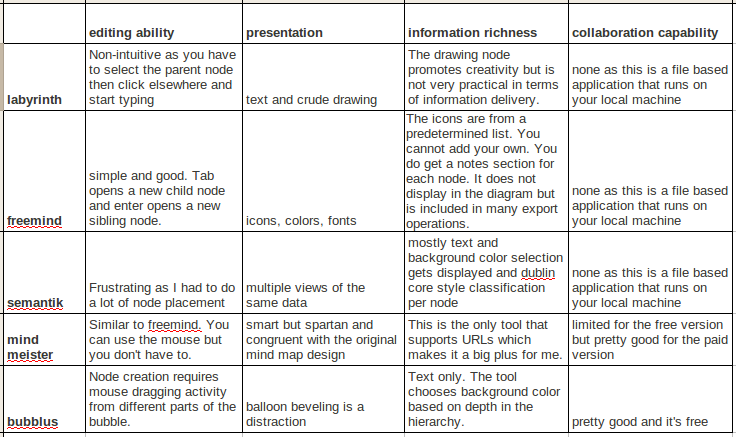
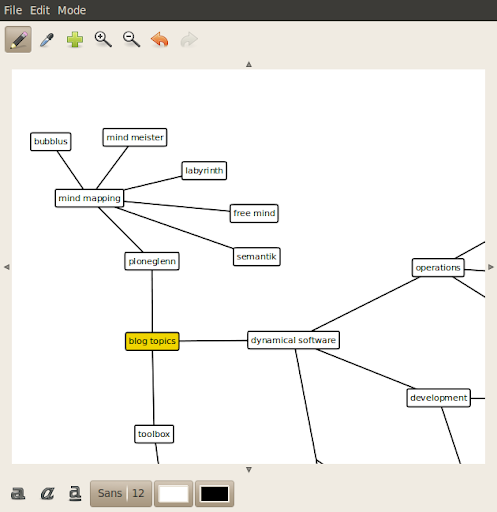
Labyrinth is a Gnome tool so it is for Linux users only. Labyrinth can be easily installed from the Ubuntu software center. It's not the best tool by far but I end up using it because mind maps created in Labyrinth can be indexed by the search tool Beagle. Here is a screen shot of a labyrinth mind map of this very blog.
Freemind is a great stand-alone tool for mind mapping. The GUI doesn't get in the way of your creativity. Freemind is written in Java so it can be run from Windows, Mac OS X, or Linux. Files saved in one OS can be opened in another.
Semantik is written on top of KDE so it is another Linux only tool. It's focus is to aid students in generating documents based on mind maps. Semantik can also be easily installed from the Ubuntu software center.
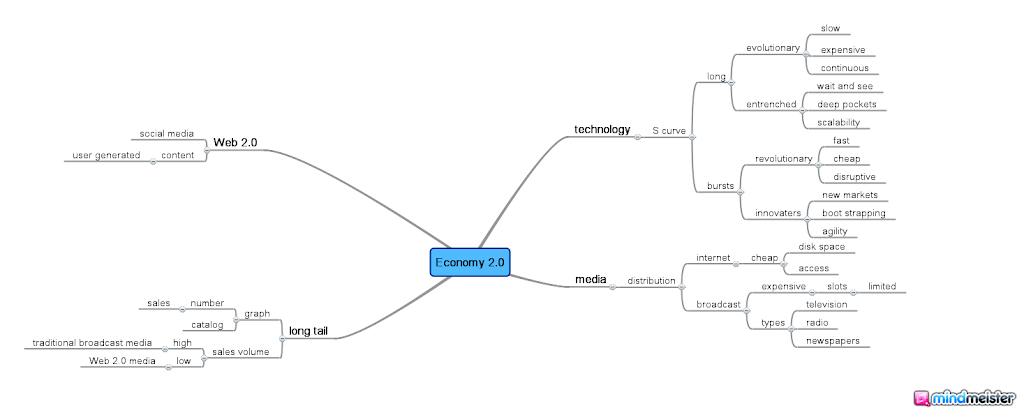
You don't install Mind Meister on your local machine because it is a web application that you access through your browser. Mind Meister stays true to the original concepts of mind mapping yet extends those ideas in useful and relevant ways. Mind Meister is a commercial company based on the freemium model so you don't get to fully access all the features without paying a monthly subscription.
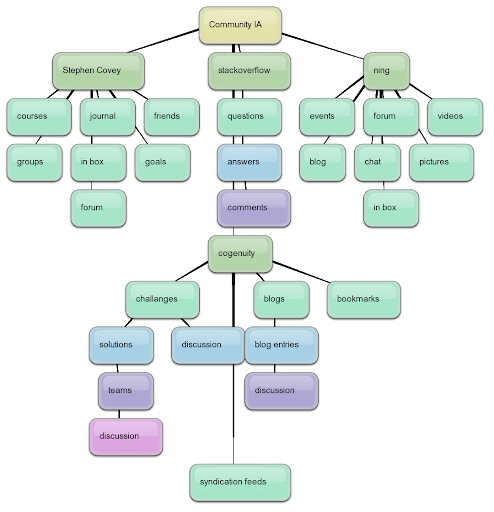
At first glance, Bubblus diagrams don't look all that much traditional mind maps. Like Mind Meister, Bubblus is also a web application that you do not install on your local machine. Unlike Mind Meister, Bubblus is free forever so you get full access to all of its features without a monthly subscription fee.
Mind mapping is a great way to explore the hierarchy of ideas through creative diagramming. These five free tools present the state of computer based mind mapping in 2010.
I like mind mapping. I have always believed that diagrams are the instrument of thought and the mind map is a great diagram for composers of all types or simply for those wishing to organize their ideas.
Here is my short list of open source mind mapping tools that are thriving in 2010.
Labyrinth is a Gnome tool so it is for Linux users only. Labyrinth can be easily installed from the Ubuntu software center. It's not the best tool by far but I end up using it because mind maps created in Labyrinth can be indexed by the search tool Beagle. Here is a screen shot of a labyrinth mind map of this very blog.
Freemind is a great stand-alone tool for mind mapping. The GUI doesn't get in the way of your creativity. Freemind is written in Java so it can be run from Windows, Mac OS X, or Linux. Files saved in one OS can be opened in another.
Semantik is written on top of KDE so it is another Linux only tool. It's focus is to aid students in generating documents based on mind maps. Semantik can also be easily installed from the Ubuntu software center.
You don't install Mind Meister on your local machine because it is a web application that you access through your browser. Mind Meister stays true to the original concepts of mind mapping yet extends those ideas in useful and relevant ways. Mind Meister is a commercial company based on the freemium model so you don't get to fully access all the features without paying a monthly subscription.
At first glance, Bubblus diagrams don't look all that much traditional mind maps. Like Mind Meister, Bubblus is also a web application that you do not install on your local machine. Unlike Mind Meister, Bubblus is free forever so you get full access to all of its features without a monthly subscription fee.
Mind mapping is a great way to explore the hierarchy of ideas through creative diagramming. These five free tools present the state of computer based mind mapping in 2010.
Saturday, September 4, 2010
Integrating Email with Voice Mail
Last week, Google announced that they were integrating their VoIP technology with their email service.
Some interpret this as big brother closing the noose around smaller offerings such as Skype. Indeed, maybe that is why Skype is willing to be acquired by Cisco. Let the big boys battle it out.
I have been using Google Voice for a while and I do like the ability to see voice messages that people leave on your phone as text in an email style GUI. The usage pattern seems to be to use text to negotiate when to have a real time phone conversation so this integration does seem to be a natural next step for Google Voice.
Some interpret this as big brother closing the noose around smaller offerings such as Skype. Indeed, maybe that is why Skype is willing to be acquired by Cisco. Let the big boys battle it out.
I have been using Google Voice for a while and I do like the ability to see voice messages that people leave on your phone as text in an email style GUI. The usage pattern seems to be to use text to negotiate when to have a real time phone conversation so this integration does seem to be a natural next step for Google Voice.
Sunday, May 30, 2010
The Rise of the Social Media Aggregator
I think that it goes without saying that there is a tremendous impact that social media is playing right now on the Internet. Checking out the identity and entertainment lines on my favorite metro style web trends map shows how sites like Twitter, Facebook, Hi5, Bebo, Freindster, Plaxo, Orkut, and Friendfeed take up a considerable amount of the online traffic. Social media features are permeating almost every aspect of both corporate and consumer computing. Many users leverage multiple social networking sites such as 43% of Hi5 users also use MySpace and Facebook users tend to use 2.9 major social networking sites on average.
So, it should come as no surprise that there is now a plethora of applications presenting an aggregated view of multiple social networking sites. Apparently, it must make sense that the more sophisticated and active social networkers want a single UX that works across (and unifies) multiple, heterogeneous social networks.
I guess that the grand-father of this genus would be TweetDeck. They have versions for the Mac, PC, Linux, iPhone, iPod Touch, and iPad and support for the Twitter, Facebook, MySpace, Linked In, Google Buzz, and Foursquare networks.
Hootsuite is targeting the more dedicated media professional. They do support an aggregated UX for Twitter, Facebook, and Linked In. Their forte is a deeper integration and extension of Twitter with features for statistics, lists, workflow, and brand monitoring.
Digsby combines email, instant messaging, and social media aggregation. They support Facebook, Twitter, MySpace, and Linked In.

Even the open source folks are getting into the act. Gwibber is a micro-blogging client for an aggregated experience with Twitter, Identi.ca, StatusNet, Facebook, Flickr, Digg, FriendFeed, and Qaiku. I recently ran across Gwibber because it comes pre-installed on the latest LTS (Long Term Support) release of Ubuntu, still the most popular distro for Linux users.
Since social media users appear to want a unified experience in their micro-blogging, how long will it be before there is a recognized need for a unified social profile? I suspect that it will be something beyond what Disqus and Gravatar can provide. Will Google's OpenSocial initiative satisfy that need?
What other brewing trends can you spot amongst the social media set?
So, it should come as no surprise that there is now a plethora of applications presenting an aggregated view of multiple social networking sites. Apparently, it must make sense that the more sophisticated and active social networkers want a single UX that works across (and unifies) multiple, heterogeneous social networks.
I guess that the grand-father of this genus would be TweetDeck. They have versions for the Mac, PC, Linux, iPhone, iPod Touch, and iPad and support for the Twitter, Facebook, MySpace, Linked In, Google Buzz, and Foursquare networks.
Hootsuite is targeting the more dedicated media professional. They do support an aggregated UX for Twitter, Facebook, and Linked In. Their forte is a deeper integration and extension of Twitter with features for statistics, lists, workflow, and brand monitoring.
Digsby combines email, instant messaging, and social media aggregation. They support Facebook, Twitter, MySpace, and Linked In.
Even the open source folks are getting into the act. Gwibber is a micro-blogging client for an aggregated experience with Twitter, Identi.ca, StatusNet, Facebook, Flickr, Digg, FriendFeed, and Qaiku. I recently ran across Gwibber because it comes pre-installed on the latest LTS (Long Term Support) release of Ubuntu, still the most popular distro for Linux users.
Since social media users appear to want a unified experience in their micro-blogging, how long will it be before there is a recognized need for a unified social profile? I suspect that it will be something beyond what Disqus and Gravatar can provide. Will Google's OpenSocial initiative satisfy that need?
What other brewing trends can you spot amongst the social media set?
Friday, February 12, 2010
3D Education
Two of my interests are virtual worlds and enterprise collaboration. I attended an event recently that touched on both of these interests. Two University professors talked about their recently released book on collaborative learning in virtual worlds.
In the early days of education, the predominant model was a master/apprentice one which didn't scale as the population grew and as democracy became popular. So, the model switched to a declarative one. Now, with the advent of 3D virtual worlds such as Second Life, the apprentice model becomes scalable since there is no economic boundary to physical location anymore.
Other movement has indicated an increased interest in virtual worlds for the enterprise. SAIC, Inc. provides scientific, engineering, systems integration, and technical services and solutions to various branches of the U.S. military, agencies of the U.S. Department of Defense, the intelligence community, the U.S. Department of Homeland Security and other U.S. government civil agencies, state and local government agencies, foreign governments, and customers in select commercial markets. They have recently acquired Forterra Systems, Inc. which provides a virtual world technology focused on enterprise training.
What do you think? Will virtual worlds ever mature beyond that of video games? Is there a legitimate use of virtual world technology in the enterprise? I'd be interested in your opinions.
In the early days of education, the predominant model was a master/apprentice one which didn't scale as the population grew and as democracy became popular. So, the model switched to a declarative one. Now, with the advent of 3D virtual worlds such as Second Life, the apprentice model becomes scalable since there is no economic boundary to physical location anymore.
Other movement has indicated an increased interest in virtual worlds for the enterprise. SAIC, Inc. provides scientific, engineering, systems integration, and technical services and solutions to various branches of the U.S. military, agencies of the U.S. Department of Defense, the intelligence community, the U.S. Department of Homeland Security and other U.S. government civil agencies, state and local government agencies, foreign governments, and customers in select commercial markets. They have recently acquired Forterra Systems, Inc. which provides a virtual world technology focused on enterprise training.
What do you think? Will virtual worlds ever mature beyond that of video games? Is there a legitimate use of virtual world technology in the enterprise? I'd be interested in your opinions.
Sunday, January 17, 2010
The Flat Enterprise Society
My company has a few collaboration products (Code-Roller and Cogenuity) so I often write about ECM because it is an exciting industry to be in these days.
Enterprise Collaboration is exciting in terms of growth but it is also exciting because its thought leaders have something interesting to say. Folks like Thomas Malone, Andrew McAfee, and Dion Hinchcliffe are doing a lot to advance modern corporate tribal thinking to greater levels of democratic culture.
Like any disruptive innovation, change is required in order to realize any benefits. Change has to come from both the board room and the water cooler in order for it to have any lasting effect. True change must come from above and below, from the executives and the rank-and-file. That turning point is what is usually called the watershed moment in the adoption curve of any paradigm shift.
That is why I got excited when I read this NY Times interview of the CEO of SunGard. Cristóbal Conde explains in day-to-day, boots-on-the-ground terms that any C level player can understand how the old ways of top down management simply won't scale in this modern age of global competition, cheaper communications, and the rising price of oil.
Conde does not come off as pompous. He talks about mistakes that he made before he understood the true value of collaboration. Other valid points that he makes include the fallacy of micro-management, the importance of intellectual curiosity, and the mental illness known as PowerPoint. Sounds provocative? Definitely give this one a read.
Enterprise Collaboration is exciting in terms of growth but it is also exciting because its thought leaders have something interesting to say. Folks like Thomas Malone, Andrew McAfee, and Dion Hinchcliffe are doing a lot to advance modern corporate tribal thinking to greater levels of democratic culture.
Like any disruptive innovation, change is required in order to realize any benefits. Change has to come from both the board room and the water cooler in order for it to have any lasting effect. True change must come from above and below, from the executives and the rank-and-file. That turning point is what is usually called the watershed moment in the adoption curve of any paradigm shift.
That is why I got excited when I read this NY Times interview of the CEO of SunGard. Cristóbal Conde explains in day-to-day, boots-on-the-ground terms that any C level player can understand how the old ways of top down management simply won't scale in this modern age of global competition, cheaper communications, and the rising price of oil.
Conde does not come off as pompous. He talks about mistakes that he made before he understood the true value of collaboration. Other valid points that he makes include the fallacy of micro-management, the importance of intellectual curiosity, and the mental illness known as PowerPoint. Sounds provocative? Definitely give this one a read.
Sunday, December 27, 2009
3D is the New Talkies
I just watched Avatar last night and it is now clear to me that 3D is the new talkies.
What are talkies, you ask? Whenever a disruptive innovation hits the movie industry and gains traction, it tends to take over the entire industry. This was the case back in the 20's when synchronized sound was added to film. This new type of movie was called a talkie since actor dialog was the new and most salient feature. It happened again in the 50's when color films became mainstream.
It's happening now with 3D in which the viewer uses a specially treated pair of glasses to watch films processed to work with those glasses such that the elements of the film appear to have depth.
It sometimes takes a while for a technology to go mainstream. The first color processing was invented in the 20's and an earlier wave of 3D movies from the 50's died out, primarily because of the more primitive polarization effects used then resulted in eye strain and headaches. That is not the case with modern 3D.
Just like with color, animation and remastering old favorites are early adopters.
Both movie industry equipment vendors and movie theaters are making investments in the technology.
A lot of big name directors are positioning for their first 3D releases. Other applications of the technology are also being explored.
I am already starting to see in video rental that the other side of the disk is the 3D version and half of the previews what I saw when I went to see Avatar were also in 3D.
I've seen the future and it appears to be 3D.
What are talkies, you ask? Whenever a disruptive innovation hits the movie industry and gains traction, it tends to take over the entire industry. This was the case back in the 20's when synchronized sound was added to film. This new type of movie was called a talkie since actor dialog was the new and most salient feature. It happened again in the 50's when color films became mainstream.
It's happening now with 3D in which the viewer uses a specially treated pair of glasses to watch films processed to work with those glasses such that the elements of the film appear to have depth.
It sometimes takes a while for a technology to go mainstream. The first color processing was invented in the 20's and an earlier wave of 3D movies from the 50's died out, primarily because of the more primitive polarization effects used then resulted in eye strain and headaches. That is not the case with modern 3D.
Just like with color, animation and remastering old favorites are early adopters.
Both movie industry equipment vendors and movie theaters are making investments in the technology.
A lot of big name directors are positioning for their first 3D releases. Other applications of the technology are also being explored.
I am already starting to see in video rental that the other side of the disk is the 3D version and half of the previews what I saw when I went to see Avatar were also in 3D.
I've seen the future and it appears to be 3D.
Tuesday, December 1, 2009
Pros and Cons to Open Source Business Models
I just read this NY Times article on Open Source as a Model for Business is Elusive which claims that successful open source companies have more societal and strategic value than financial and cites the effect that MySql is having on the EU's evaluation of Oracle's acquisition of Sun as an example. They worry that if Oracle acquires Sun, then they will kill MySql which is a low cost alternative to Oracle's database product.
The article lists the usual suspects in their case both for and against open source; Red Hat, XenSource, and Mozilla being the three top reference models.
They also show how open source companies are supported by large technology vendors with deep pockets in order to wage proxy wars with their competitors. Google with Mozilla and IBM with Linux against Microsoft are two examples cited. This is actually Oracle's defense against the EU's concerns in that Oracle claims that they will continue to support MySql in order to eat into Microsoft's Sql Server market.
It seems that the exit strategy for open source companies these days is in acquisition over going public. Witness the recent purchase of SpringSource by VMware in order to gain more control up the API virtualization stack as the corporate world turns towards cloud computing. The acquisition of XenSource by Citrix is another example.
Giga OM countered to this article with an article of their own with the claim that Open Source Business Models Aren't Dead End Streets. They cite Android, Acquia, and Cloudera as example companies.
The article lists the usual suspects in their case both for and against open source; Red Hat, XenSource, and Mozilla being the three top reference models.
They also show how open source companies are supported by large technology vendors with deep pockets in order to wage proxy wars with their competitors. Google with Mozilla and IBM with Linux against Microsoft are two examples cited. This is actually Oracle's defense against the EU's concerns in that Oracle claims that they will continue to support MySql in order to eat into Microsoft's Sql Server market.
It seems that the exit strategy for open source companies these days is in acquisition over going public. Witness the recent purchase of SpringSource by VMware in order to gain more control up the API virtualization stack as the corporate world turns towards cloud computing. The acquisition of XenSource by Citrix is another example.
Giga OM countered to this article with an article of their own with the claim that Open Source Business Models Aren't Dead End Streets. They cite Android, Acquia, and Cloudera as example companies.
Sunday, August 30, 2009
Freemium Revisited
Earlier this year, I wrote about a WSJ article that covered the revenue model known as freemium which is a combination of free and premium. The idea is that you release a free version of your offering in order to capture a larger market share and depend on some segment of your market upgrading to a paid version.
I just read a NY Times article that used their coverage of a start-up that makes a product called Evernote to weigh in on the freemium topic.
I knew about Evernote back when it was just a freeware windows application that you could use to capture notes of various media types in one place that was searchable. Their biggest competition at that time was Microsoft's OneNote product which is now bundled with MS-Office and, frankly, I've never seen anyone use it.
Now, the windows app communicates with a centralized network which acts as a repository that you can access from multiple computers or share with others for the purposes of collaboration.
May I digress for a couple of paragraphs? A large part of my training as an engineer was in the black art of categorization. You learn to categorize things. You learn to categorize everything. The predilection to DnD is a natural one because engineers learn how to transform stuff. For example, software engineers learn how to transform specifications into working software. Transformations of that order are fancy sequences of simpler transformations. A simple transformation consists of the thing or things to be transformed (the operands) and the process by which the transformation is to be guided (the operator). The role of the engineer is to figure out that sequence of transformations and also which process to apply for each simple transformation. In engineer speak, this is called "finding the right tool for the job."
Because engineers are trained to categorize, they want a large toolbox with a wide variety of tools by which they can use to transform things. It gives them more choice, more freedom. Those who never received training on how to categorize see this as a liability instead of a benefit. They want only one choice of tool. They want a tool that does it all.
That is why I don't use Evernote. It is a single container by which you are supposed to put everything into. I doesn't appeal to me but I recognize that it does appeal to a very large number of people. How do you feel about it? Would you rather just open a document because you want to access it or would you like to choose which tool to open a document in because different tools have different specialties and you wish to pick the tool that is most conducive to the job at hand?
Anyway, back to freemium. What's really interesting about this NY Times article is that they put some numbers to the Evernote's take on the model. They currently have a half million active users. If you stay with the service for a year, then there's a four percent chance that you will subscribe at $5 per month. They claimed that they earned $79,000 in July which, according to their other figures, means that three percent of the total active user base subscribes. They project that this subscription rate could climb to as high as 22% which would yield a little over a half million on revenue per month.
They also claim that this will scale. They won't have to staff up further as more people subscribe. They claim that their current costs is nine cents per user per month and project a break-even date of January 2011.
Whether or not you believe these numbers, the freemium model is compelling and is most probably worth some exploration and consideration. I use it in my business where access to Code Roller (the community edition of a software development project life cycle management solution) is free for all (including my competition) but you have to pay if you want my company to develop the actual software being described by your project.
What is your take on the freemium revenue model? Is it an exciting way to gain market share or do the challenges of monetization and fear of commoditization of your product or service give you pause?
I just read a NY Times article that used their coverage of a start-up that makes a product called Evernote to weigh in on the freemium topic.
I knew about Evernote back when it was just a freeware windows application that you could use to capture notes of various media types in one place that was searchable. Their biggest competition at that time was Microsoft's OneNote product which is now bundled with MS-Office and, frankly, I've never seen anyone use it.
Now, the windows app communicates with a centralized network which acts as a repository that you can access from multiple computers or share with others for the purposes of collaboration.
May I digress for a couple of paragraphs? A large part of my training as an engineer was in the black art of categorization. You learn to categorize things. You learn to categorize everything. The predilection to DnD is a natural one because engineers learn how to transform stuff. For example, software engineers learn how to transform specifications into working software. Transformations of that order are fancy sequences of simpler transformations. A simple transformation consists of the thing or things to be transformed (the operands) and the process by which the transformation is to be guided (the operator). The role of the engineer is to figure out that sequence of transformations and also which process to apply for each simple transformation. In engineer speak, this is called "finding the right tool for the job."
Because engineers are trained to categorize, they want a large toolbox with a wide variety of tools by which they can use to transform things. It gives them more choice, more freedom. Those who never received training on how to categorize see this as a liability instead of a benefit. They want only one choice of tool. They want a tool that does it all.
That is why I don't use Evernote. It is a single container by which you are supposed to put everything into. I doesn't appeal to me but I recognize that it does appeal to a very large number of people. How do you feel about it? Would you rather just open a document because you want to access it or would you like to choose which tool to open a document in because different tools have different specialties and you wish to pick the tool that is most conducive to the job at hand?
Anyway, back to freemium. What's really interesting about this NY Times article is that they put some numbers to the Evernote's take on the model. They currently have a half million active users. If you stay with the service for a year, then there's a four percent chance that you will subscribe at $5 per month. They claimed that they earned $79,000 in July which, according to their other figures, means that three percent of the total active user base subscribes. They project that this subscription rate could climb to as high as 22% which would yield a little over a half million on revenue per month.
They also claim that this will scale. They won't have to staff up further as more people subscribe. They claim that their current costs is nine cents per user per month and project a break-even date of January 2011.
Whether or not you believe these numbers, the freemium model is compelling and is most probably worth some exploration and consideration. I use it in my business where access to Code Roller (the community edition of a software development project life cycle management solution) is free for all (including my competition) but you have to pay if you want my company to develop the actual software being described by your project.
What is your take on the freemium revenue model? Is it an exciting way to gain market share or do the challenges of monetization and fear of commoditization of your product or service give you pause?
Monday, August 24, 2009
Understanding Google Wave
In late May of this year, Google announced a new technology initiative of theirs called Google Wave. What is this technology about and why should anyone care?
Early reports painted the picture of Google Wave being a hybrid between instant messaging and email with an emphasis on conversant collaboration. Because of that observation, people just thought it was an email killer and Internet attention went elsewhere. After all, who is dissatisfied with email?
Since then, many Internet pundits have weighed in on the subject. Some claim that it is too complicated for rapid adoption. Others see it more as a platform for enterprise collaboration than as an email killer.
Google Wave is scheduled to expand its beta audience in about a month from now. Many sources are now skeptical about whether or not the technology is stable enough to take that step.
So, why should you care? Whether or not Google can make its commitment by the end of the week is immaterial to me. What is important is that if they can carry this off and deliver on the promise of Google Wave, then I believe Google Wave can be a dramatic game changing innovation to those web properties that thrive on user generated content.
But innovation is not always well received nor easy to accept. I will go into more details about this in a future post but what Google Wave empowers is real-time conversations across multiple web properties. Imagine a world where discussion threads are transformed into persistent chat rooms that cluster around a particular topic instead of belonging to a particular article or blog entry. Each web page devoted to that topic could share in the discussion yet the participants could also track the complete conversation in a web GUI that does look like email on steroids.
So, what's the problem? What's the big deal? This means that web properties are going to have to be ready to let go of some traffic away from their site in order to open their site up to more traffic from other sites. This philosophy runs counter to the current practice of stickiness where web sites do anything to capture and retain visitors to their site.
I'm a big advocate of sharing information online as a necessary step to fostering healthy and prosperous communities of practice so here's hoping that this wave is one that catches on. Stay tuned for more developments in September.
Early reports painted the picture of Google Wave being a hybrid between instant messaging and email with an emphasis on conversant collaboration. Because of that observation, people just thought it was an email killer and Internet attention went elsewhere. After all, who is dissatisfied with email?
Since then, many Internet pundits have weighed in on the subject. Some claim that it is too complicated for rapid adoption. Others see it more as a platform for enterprise collaboration than as an email killer.
Google Wave is scheduled to expand its beta audience in about a month from now. Many sources are now skeptical about whether or not the technology is stable enough to take that step.
So, why should you care? Whether or not Google can make its commitment by the end of the week is immaterial to me. What is important is that if they can carry this off and deliver on the promise of Google Wave, then I believe Google Wave can be a dramatic game changing innovation to those web properties that thrive on user generated content.
But innovation is not always well received nor easy to accept. I will go into more details about this in a future post but what Google Wave empowers is real-time conversations across multiple web properties. Imagine a world where discussion threads are transformed into persistent chat rooms that cluster around a particular topic instead of belonging to a particular article or blog entry. Each web page devoted to that topic could share in the discussion yet the participants could also track the complete conversation in a web GUI that does look like email on steroids.
So, what's the problem? What's the big deal? This means that web properties are going to have to be ready to let go of some traffic away from their site in order to open their site up to more traffic from other sites. This philosophy runs counter to the current practice of stickiness where web sites do anything to capture and retain visitors to their site.
I'm a big advocate of sharing information online as a necessary step to fostering healthy and prosperous communities of practice so here's hoping that this wave is one that catches on. Stay tuned for more developments in September.
Sunday, July 26, 2009
The Browser Wars Circa 2009
If you have any understanding of computer technology and you haven't been in a coma for the past twelve years, then you already know that there has been a very significant trend in software application development from windows based applications to web applications.
The drivers for this trend aren't very hard to comprehend. A traditional windows application incurs a lot more development costs in terms of installation and testing on the various different types of client computers (i.e. PCs) than the same app delivered as HTML over the web. While there have been impressive advancements in reducing windows application testing and deployment over the years, there is still a higher TCO for windows apps than for web apps.
Not that web apps will completely take over windows apps. Some areas, such as graphics manipulation, VoIP, and video capture, will most probably always be in the province of windows apps. At a minimum, you will always need a web browser running on the client machine as a windows app in order to get access to the web apps. Without the web browser, the web apps are useless.
This is nothing new to the major technology vendors. As competitors over gaining IT market share, they have known this for quite some time. Own the web browser and you own the web. That is why Microsoft aggressively went after Netscape back in the mid 90s. Netscape was the corporation that formed around the original inventors of the web browser. This competition between Netscape and Microsoft eventually led to Netscape being acquired by AOL in 1998. Round one of the browser wars goes to Microsoft.
But the founders of Netscape were not willing to give up so easily. Even as the company was being sold, they created a non-profit foundation devoted to the proposition that innovation on the Internet would thrive only if there was available a web browser that was not so directly controlled by any single vendor. This Mozilla Foundation eventually spun off a for profit subsidiary in order to gain the revenue needed to continue to provide a quality web browser.
This "phoenix from the ashes" strategy worked well. While continued development of Microsoft's web browser languished, the Mozilla browser (called Firefox) continued to enhance and innovate on the web browsing experience. Mozilla was able to do this because they used the open source model to keep their development costs low. Recently, there has been much speculation about the mass migration of web browsing from Microsoft's Internet Explorer web browser to Firefox. Round two of the browser wars goes to Mozilla.
What about the other players in this war? Well, Apple has always had a place on the battlefield with their Safari browser. They don't have much in the way of market share, however. There's a few other minor players but their low market share numbers make it such that they are really not worth mentioning here. What is newsworthy is when Google announced their entry into this war with their web browser named Chrome. For one thing, a lot of the revenue for Mozilla comes from Google. The concern is that revenue stream will dry up now that Google and Mozilla are direct competitors.
Google Chrome currently doesn't have a lot of market share yet so why the concern about Chrome? Google is a big company with deep pockets. This coup has been tried before by another big company with deep pockets, Microsoft. Google is ratcheting up their marketing machine over Chrome.
There are also some noticeable difference between what Google has done with Chrome and what Microsoft did with Internet Explorer. The biggest difference is that Chrome is based on open source.
Recently, the NY Times published a story on the latest turn of events in the web browser wars. The war is very lukewarm now. Not a hot war at all. Google will continue to fund Mozilla, at least until 2011. Google's funding accounts for over three fourths of Mozilla's revenues. Mozilla recently moved their physical office away from the main Google campus.
Why do you care? If you are a software vendor or IT shop that makes and publishes web applications, then you want to make sure your applications run smoothly in the most popular web browsers. If your web applications suddenly stop working, then you have a serious problem.
That is why industry watchers keep up with the web browser wars. They don't want to be caught by surprise by the threat of a web browser upgrade or patch that was purposely designed to destroy the competition.
The drivers for this trend aren't very hard to comprehend. A traditional windows application incurs a lot more development costs in terms of installation and testing on the various different types of client computers (i.e. PCs) than the same app delivered as HTML over the web. While there have been impressive advancements in reducing windows application testing and deployment over the years, there is still a higher TCO for windows apps than for web apps.
Not that web apps will completely take over windows apps. Some areas, such as graphics manipulation, VoIP, and video capture, will most probably always be in the province of windows apps. At a minimum, you will always need a web browser running on the client machine as a windows app in order to get access to the web apps. Without the web browser, the web apps are useless.
This is nothing new to the major technology vendors. As competitors over gaining IT market share, they have known this for quite some time. Own the web browser and you own the web. That is why Microsoft aggressively went after Netscape back in the mid 90s. Netscape was the corporation that formed around the original inventors of the web browser. This competition between Netscape and Microsoft eventually led to Netscape being acquired by AOL in 1998. Round one of the browser wars goes to Microsoft.
But the founders of Netscape were not willing to give up so easily. Even as the company was being sold, they created a non-profit foundation devoted to the proposition that innovation on the Internet would thrive only if there was available a web browser that was not so directly controlled by any single vendor. This Mozilla Foundation eventually spun off a for profit subsidiary in order to gain the revenue needed to continue to provide a quality web browser.
This "phoenix from the ashes" strategy worked well. While continued development of Microsoft's web browser languished, the Mozilla browser (called Firefox) continued to enhance and innovate on the web browsing experience. Mozilla was able to do this because they used the open source model to keep their development costs low. Recently, there has been much speculation about the mass migration of web browsing from Microsoft's Internet Explorer web browser to Firefox. Round two of the browser wars goes to Mozilla.
What about the other players in this war? Well, Apple has always had a place on the battlefield with their Safari browser. They don't have much in the way of market share, however. There's a few other minor players but their low market share numbers make it such that they are really not worth mentioning here. What is newsworthy is when Google announced their entry into this war with their web browser named Chrome. For one thing, a lot of the revenue for Mozilla comes from Google. The concern is that revenue stream will dry up now that Google and Mozilla are direct competitors.
Google Chrome currently doesn't have a lot of market share yet so why the concern about Chrome? Google is a big company with deep pockets. This coup has been tried before by another big company with deep pockets, Microsoft. Google is ratcheting up their marketing machine over Chrome.
There are also some noticeable difference between what Google has done with Chrome and what Microsoft did with Internet Explorer. The biggest difference is that Chrome is based on open source.
Recently, the NY Times published a story on the latest turn of events in the web browser wars. The war is very lukewarm now. Not a hot war at all. Google will continue to fund Mozilla, at least until 2011. Google's funding accounts for over three fourths of Mozilla's revenues. Mozilla recently moved their physical office away from the main Google campus.
Why do you care? If you are a software vendor or IT shop that makes and publishes web applications, then you want to make sure your applications run smoothly in the most popular web browsers. If your web applications suddenly stop working, then you have a serious problem.
That is why industry watchers keep up with the web browser wars. They don't want to be caught by surprise by the threat of a web browser upgrade or patch that was purposely designed to destroy the competition.
Friday, May 22, 2009
Linking is a Good Thing
Twenty years ago, Oxford University graduate Tim Berners-Lee wrote a memo to his boss while he was working at CERN. This memo was an information management proposal for a distributed hypertext system that we now know of as the World Wide Web. Note the major feature that he describes which was not video blogging nor banner ads nor even online chat. The major feature in this proposal was hypertext or "human-readable information linked together in an unconstrained way."
This past February, the same visionary gave a presentation at the annual TED Conference where he was still advocating for more or less the same thing. This time, instead of web pages linking to each other, the data that feeds web pages should also be available online and link to each other. This is what is called Linked Data.
Linked Data is collectively intelligent. Individuals contribute relationship information when they link. This relationship information aggregates into fantastic models of our world. Models that help researchers, journalists, and ordinary folk span problem domains in order to solve new and ever increasingly complex challenges.
But there are barriers in the adoption of Linked Data whose measure of success and effectiveness will depend directly on its ubiquity. One big problem is that many organizations value their data and quite naturally wish to protect it. Propriety and intellectual capital are profound cultural barriers to linked data that I, for one, do not understand how to overcome. I think that it's going to be a little more of a challenge than simply to ask you to stop it.
Here is another, even bigger, cultural problem to Linked Data. In our current web society where page rank is the coin of the realm, nobody wants to provide links anymore. Linking is passé. When you link out to another site, you contribute to their page rank. If you compete with that site, then that diminishes your page rank. It's some weird mind-share zero sum game. It's the new variation on the tragedy of the commons all over again. You're so protective of your own page rank that you dare not provide outbound links. Thus, the original, fundamental, collectively intelligent value of the World Wide Web is tragically subverted by individual or organizational greed. This mindset has gotten so bad that many sites automatically flag your content as spam if it includes a link in it. I link a lot in my posts so I can tell you from first hand experience that many prejudiced people will dismiss you as a spammer if you provide a link, even if you are linking to something that you have no official relationship with.
Once again, this noble visionary has provided a map to a more intelligent world but we are going to have to revisit our current values in order to completely embrace the gifts that he has given us.
This past February, the same visionary gave a presentation at the annual TED Conference where he was still advocating for more or less the same thing. This time, instead of web pages linking to each other, the data that feeds web pages should also be available online and link to each other. This is what is called Linked Data.
Linked Data is collectively intelligent. Individuals contribute relationship information when they link. This relationship information aggregates into fantastic models of our world. Models that help researchers, journalists, and ordinary folk span problem domains in order to solve new and ever increasingly complex challenges.
But there are barriers in the adoption of Linked Data whose measure of success and effectiveness will depend directly on its ubiquity. One big problem is that many organizations value their data and quite naturally wish to protect it. Propriety and intellectual capital are profound cultural barriers to linked data that I, for one, do not understand how to overcome. I think that it's going to be a little more of a challenge than simply to ask you to stop it.
Here is another, even bigger, cultural problem to Linked Data. In our current web society where page rank is the coin of the realm, nobody wants to provide links anymore. Linking is passé. When you link out to another site, you contribute to their page rank. If you compete with that site, then that diminishes your page rank. It's some weird mind-share zero sum game. It's the new variation on the tragedy of the commons all over again. You're so protective of your own page rank that you dare not provide outbound links. Thus, the original, fundamental, collectively intelligent value of the World Wide Web is tragically subverted by individual or organizational greed. This mindset has gotten so bad that many sites automatically flag your content as spam if it includes a link in it. I link a lot in my posts so I can tell you from first hand experience that many prejudiced people will dismiss you as a spammer if you provide a link, even if you are linking to something that you have no official relationship with.
Once again, this noble visionary has provided a map to a more intelligent world but we are going to have to revisit our current values in order to completely embrace the gifts that he has given us.
Sunday, May 10, 2009
Implementing Virtual Worlds in Business
I occasionally cover stories on enterprise focused virtual worlds technology because I believe that it shows some promise and could, therefore, become a relevant trend. Last week, I attended an event in Second Life hosted by Nokia on this topic.
This event had a question oriented talk show format in which representatives from IBM, Linden Labs, Nokia, and Remedy Communications promoted their respective company's efforts in enterprise virtual worlds.

I hope that I don't have to explain who IBM and Nokia is and why they might be interested in enterprise virtual worlds. IBM hosted their own two day conference on the subject not too long ago. Their representative at this event was Zha Ewry who is a male using a female avatar in a professional role.
Linden Labs is the company behind Second Life. They host a public grid and sell the platform to companies who want a virtual world behind the firewall.
Remedy Communications is a marketing company who specializes in developing marketing collateral in virtual worlds. They have recently become a reseller for Rivers Run Red who competes with Linden Labs in what they brand as the immersive enterprise collaboration space. Their representative at this event had an avatar named Dusan.
Someone from Sun Microsystems was supposed to be here too but never showed up. Considering their recent change in leadership, I can only assume that there was a sudden and last minute change in plans.
One of the biggest things I learned at this event is that there are now several video sites devoted to enterprise virtual worlds. Metanomics takes on an education based approach to fostering corporate appreciation for virtual worlds. Treet.tv will be launching later this summer. They have both an entertainment and a business focus and are a spin off of SLCN. All of these Internet video broadcast sites feature shows exclusively filmed in Second Life.
One of the advantages to a virtual world event is the presence of a back channel in which the attendees can comment amongst themselves while the event is taking place. The presenters get to monitor the back channel in real time. I learned in the back channel about an European conference called MetaMeets about the present and future of virtual worlds (also called the 3D web).
I go into more details on the content of this talk in my blog at the Toolbox for IT Knowledge Sharing Community.
This event had a question oriented talk show format in which representatives from IBM, Linden Labs, Nokia, and Remedy Communications promoted their respective company's efforts in enterprise virtual worlds.

I hope that I don't have to explain who IBM and Nokia is and why they might be interested in enterprise virtual worlds. IBM hosted their own two day conference on the subject not too long ago. Their representative at this event was Zha Ewry who is a male using a female avatar in a professional role.
Linden Labs is the company behind Second Life. They host a public grid and sell the platform to companies who want a virtual world behind the firewall.
Remedy Communications is a marketing company who specializes in developing marketing collateral in virtual worlds. They have recently become a reseller for Rivers Run Red who competes with Linden Labs in what they brand as the immersive enterprise collaboration space. Their representative at this event had an avatar named Dusan.
Someone from Sun Microsystems was supposed to be here too but never showed up. Considering their recent change in leadership, I can only assume that there was a sudden and last minute change in plans.
One of the biggest things I learned at this event is that there are now several video sites devoted to enterprise virtual worlds. Metanomics takes on an education based approach to fostering corporate appreciation for virtual worlds. Treet.tv will be launching later this summer. They have both an entertainment and a business focus and are a spin off of SLCN. All of these Internet video broadcast sites feature shows exclusively filmed in Second Life.
One of the advantages to a virtual world event is the presence of a back channel in which the attendees can comment amongst themselves while the event is taking place. The presenters get to monitor the back channel in real time. I learned in the back channel about an European conference called MetaMeets about the present and future of virtual worlds (also called the 3D web).
I go into more details on the content of this talk in my blog at the Toolbox for IT Knowledge Sharing Community.
Sunday, May 3, 2009
Living in the Facebook Downline
Just ran across this NY Times article on an emerging trend in social networks where Facebook and Twitter are openly and actively encouraging third parties to consume their services and re-purpose their content. The article then covers several startups who are feeding off of this social knowledge ecosystem.
With regards to this ecosystem, what I have seen in the wild are three patterns. A lot of UGC sites now permit you to post non-anonymously via some kind of federated login system. The second pattern is publishing content in multiple places such as micro-blogs on both facebook and twitter. The third pattern is profile synchronization across multiple social networking sites.
With federated login (sometimes called single sign on), you don't have to register at every site that requires registration. Instead, you can participate on a site as a registered user by logging in to an already existing account that you have. Under the covers the system, where you have an account, shares some knowledge about you with the system you are trying to use. Both Microsoft and Sun Microsystems tried their hand at federated login over a decade ago. Both failed miserably. Today's big players at single sign on are Google, Yahoo, and Facebook. Google and Yahoo use the OpenID technology to carry this off while Facebook uses its own Facebook Connect technology.
In the second pattern, you post some content and the system provides a way for you to immediately promote your content on the various popular social networking sites. Originally, this was called Viral Marketing where the system would volunteer to spam your friends if you would let it access the address book or contact lists from your main-stream email accounts. In this iteration, you are presented with options to send facebook notifications or tweets.
The need for the third pattern has risen only very recently as people start spending a lot of time updating their profiles on all of the social networking sites that they use. This trend is still fairly recent but two examples that come to mind are Disqus and Gravatar.
As to the startups referenced in the original NY Times article mentioned in paragraph one here, I would be a little nervous in investing in these companies. After all, they use the facebook and twitter back-ends as their main entre whereas these other companies see it more as the icing on the cake. I mean, what are they going to do if Facebook ever decides to shut down their free API?
With regards to this ecosystem, what I have seen in the wild are three patterns. A lot of UGC sites now permit you to post non-anonymously via some kind of federated login system. The second pattern is publishing content in multiple places such as micro-blogs on both facebook and twitter. The third pattern is profile synchronization across multiple social networking sites.
With federated login (sometimes called single sign on), you don't have to register at every site that requires registration. Instead, you can participate on a site as a registered user by logging in to an already existing account that you have. Under the covers the system, where you have an account, shares some knowledge about you with the system you are trying to use. Both Microsoft and Sun Microsystems tried their hand at federated login over a decade ago. Both failed miserably. Today's big players at single sign on are Google, Yahoo, and Facebook. Google and Yahoo use the OpenID technology to carry this off while Facebook uses its own Facebook Connect technology.
In the second pattern, you post some content and the system provides a way for you to immediately promote your content on the various popular social networking sites. Originally, this was called Viral Marketing where the system would volunteer to spam your friends if you would let it access the address book or contact lists from your main-stream email accounts. In this iteration, you are presented with options to send facebook notifications or tweets.
The need for the third pattern has risen only very recently as people start spending a lot of time updating their profiles on all of the social networking sites that they use. This trend is still fairly recent but two examples that come to mind are Disqus and Gravatar.
As to the startups referenced in the original NY Times article mentioned in paragraph one here, I would be a little nervous in investing in these companies. After all, they use the facebook and twitter back-ends as their main entre whereas these other companies see it more as the icing on the cake. I mean, what are they going to do if Facebook ever decides to shut down their free API?
Monday, April 27, 2009
The Whuffie Factor
I just ran across this great talk at last year's Web 2.0 conference by Tara Hunt on a knowledge management blog that I frequently visit.
She talks about how the leveraging of the feeling of reciprocity and social capital and the nurturing of a gift economy in the design of your product or web site's user experience is the most efficacious way to promote your message. She calls it The Whuffie Factor which is a term inspired from a book written by Cory Doctorow called Down and Out in the Magic Kingdom.
She also contrasts this approach to traditional PR and shows how The Whuffie Factor is a logical extension to the prosumer approach of establishing authentic conversations.
The Whuffie Factor: The 5 Keys for Maxing Social Capital and Winning with Online Communities (Tara Hunt) from Steffan Antonas on Vimeo.
She talks about how the leveraging of the feeling of reciprocity and social capital and the nurturing of a gift economy in the design of your product or web site's user experience is the most efficacious way to promote your message. She calls it The Whuffie Factor which is a term inspired from a book written by Cory Doctorow called Down and Out in the Magic Kingdom.
She also contrasts this approach to traditional PR and shows how The Whuffie Factor is a logical extension to the prosumer approach of establishing authentic conversations.
The Whuffie Factor: The 5 Keys for Maxing Social Capital and Winning with Online Communities (Tara Hunt) from Steffan Antonas on Vimeo.
Subscribe to:
Posts (Atom)
